
You are using an out of date browser. It may not display this or other websites correctly.
You should upgrade or use an alternative browser.
You should upgrade or use an alternative browser.
mau tanya.. ??
- Thread starter odod
- Start date

gadiez
New member
menggapa di blog saya tidak ada "add page element" nya?
thank's sebelumnya.......
coba ganti template dulu diliat page elemetnya
D
dresti_cool
Guest
mmmmm......... blog yang dimana?


graha_nurdian
New member
Ganti templatenya coba ato mungkin uda ad modifikasi di CSSnya trus tanpa kamu sadari blog kamu jadi versi classic
Mudah - Mudah an membantu
Mudah - Mudah an membantu

spirit
Mod
tanya lagi boleh nggak .....?
gmn cara bikin menu kayak home, about ......?
blog yang berbayar bisa tuh ...

azizi
New member
ada beberapa cara. pilih aja yang termudah
Cara 1 :
1. Buat post baru seperti biasa. misal isinya tentang About me atau About this blog atau Privacy Policy (yang saat ini diperluin buat adsense)
2. Rubah tanggal post tersebut jika diperlukan
3. Edit template nya, dan taruh link ke post tsb. misal dibagian atas atau bawah. dan tampil disetiap halaman
cara ini dari Marhgil
Cara 2 :
Adding page Elements to Blogger Blogs
When you create a Blogger Blog the template comes with a pre-defined number of page elements. If you would like to increase the number the following step by step tutorial will show you how. This lesson will deal with adding more Page Elements to the Header section of your Blogger Template.
Always download a backup before making changes.
The screenshot below shows a standard Blogger Minima Template.
Click all images to enlarge.
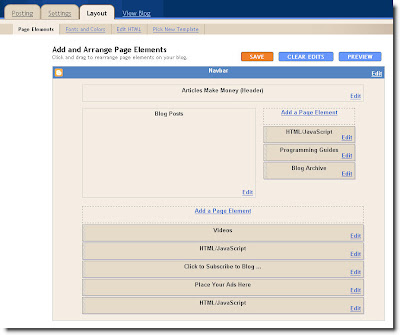
As you can see there is only one element available for the Header section on top.
This is how you can add more.
Under "layout" click "Edit HTML".
Click the "Expand Widget Template" Box.
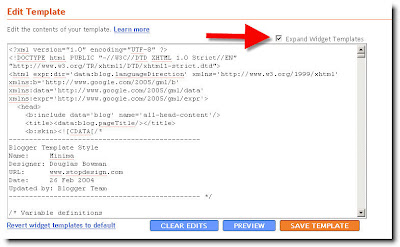
Scroll down until you come to the section that looks like this;
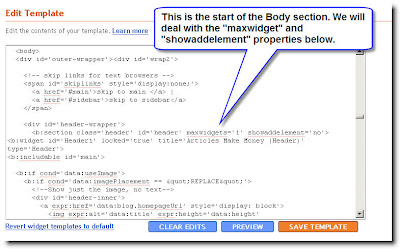
As you can see the "maxwidget" is set to 1 - this means that there is only one widget (element) available for use in the Header. You can change this to whatever amount you like. I am going to change it to 3.
After making the change be sure to change the "showaddelement" to "yes" so that you will see the option to add another element on the "layout" page.
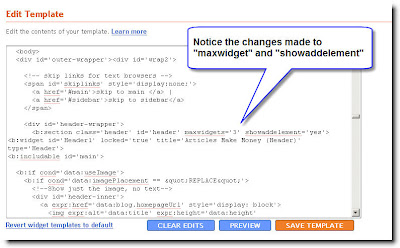
Click "Save Template" and you are done.
Your "Layout" - "Page Elements" page should now look like this.
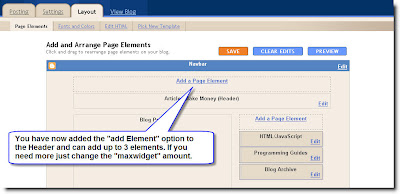
And that is how you can add or modify the page elements in Blogger. I will show you how to do this with the other sections in future posts but you may want to try it on your own. The process is the same for all the sections - Main Wrapper, Sidebar Wrapper and Footer.
Cara 1 :
1. Buat post baru seperti biasa. misal isinya tentang About me atau About this blog atau Privacy Policy (yang saat ini diperluin buat adsense)
2. Rubah tanggal post tersebut jika diperlukan
3. Edit template nya, dan taruh link ke post tsb. misal dibagian atas atau bawah. dan tampil disetiap halaman
cara ini dari Marhgil
Cara 2 :
Adding page Elements to Blogger Blogs
When you create a Blogger Blog the template comes with a pre-defined number of page elements. If you would like to increase the number the following step by step tutorial will show you how. This lesson will deal with adding more Page Elements to the Header section of your Blogger Template.
Always download a backup before making changes.
The screenshot below shows a standard Blogger Minima Template.
Click all images to enlarge.

As you can see there is only one element available for the Header section on top.
This is how you can add more.
Under "layout" click "Edit HTML".
Click the "Expand Widget Template" Box.

Scroll down until you come to the section that looks like this;

As you can see the "maxwidget" is set to 1 - this means that there is only one widget (element) available for use in the Header. You can change this to whatever amount you like. I am going to change it to 3.
After making the change be sure to change the "showaddelement" to "yes" so that you will see the option to add another element on the "layout" page.

Click "Save Template" and you are done.
Your "Layout" - "Page Elements" page should now look like this.

And that is how you can add or modify the page elements in Blogger. I will show you how to do this with the other sections in future posts but you may want to try it on your own. The process is the same for all the sections - Main Wrapper, Sidebar Wrapper and Footer.
wah udah ada yang lengkap tuh jawabnya. tapi nambahin, itu bedanya antara blog yang lama sama yang baru ( di blogger lho, kalo yang laen ga tau). blog buat adsense klik aja disini hoby adsense
spirit
Mod
nah jika blog kalian udah jadi berarti siap di iklankan
KLIK DISINI jika mau pasang iklan exlussive gratis
KLIK DISINI jika mau pasang iklan exlussive gratis
Program satu ini wajib dicoba. Jika anda bisa mengajak satu teman cowok anda untuk mendaftar di FriendFinder, anda akan dibayar $1. Untuk cewek $2. Bayangkan, jika dalam satu minggu dapat mengajak 10 orang cowok dan 10 orang cewek untuk mendaftar, berapa yang mereka bayar untuk anda?
Jika anda mengajak 10 cowok dalam satu minggu -> 10 x $1 = $10
Jika anda mengajak 10 cewek dalam satu minggu -> 10 x $2 = $20
Jumlah dalam satu minggu -> $10 + $ 20 = $30
Jumlah dalam satu bulan -> 4 x $30 = $120
$120 dalam satu bulan. Lumayan bukan? Bayangkan jika anda dapat mengajak lebih dari itu, berapa pendapatan anda?
Selain itu anda juga akan mendapat Kartu Debit Gratis. Kartu akan anda terima setelah 20 hari di rumah anda.
Klik di sini untuk mendaftar. Daftar!
Jika anda mengajak 10 cowok dalam satu minggu -> 10 x $1 = $10
Jika anda mengajak 10 cewek dalam satu minggu -> 10 x $2 = $20
Jumlah dalam satu minggu -> $10 + $ 20 = $30
Jumlah dalam satu bulan -> 4 x $30 = $120
$120 dalam satu bulan. Lumayan bukan? Bayangkan jika anda dapat mengajak lebih dari itu, berapa pendapatan anda?
Selain itu anda juga akan mendapat Kartu Debit Gratis. Kartu akan anda terima setelah 20 hari di rumah anda.
Klik di sini untuk mendaftar. Daftar!


anggorodewanto
New member
Nambahin juga, pake template wordpress buat Blogger juga bisa lho

Ahmadriadi
New member
wah tampilan blog gw ancur banget bro ada yang bisa bantu ngak?
gw pengen blog gw tuh horizontal , bukan vertikal kemudian ada searchnya agar mempermudah yang lain mencari yang diinginkanya, dan yang lbih parah gw ngak tau berapa banyak pengunjung yang udah masuk ketempat gw, tolong kasih tau key
Lihat aja tampilanya ancur bro
gw pengen blog gw tuh horizontal , bukan vertikal kemudian ada searchnya agar mempermudah yang lain mencari yang diinginkanya, dan yang lbih parah gw ngak tau berapa banyak pengunjung yang udah masuk ketempat gw, tolong kasih tau key
Lihat aja tampilanya ancur bro
Ahmadriadi
New member
gw ngak bisa login keblog gw katanya ter hapus dan katanya eror bX-b9aye5
alamatnya http://ahmadriadi.blogspot.com
blog gw terhapus karna gw menghapus google advance, gw ngak tau karena emank gw baru belajar buat blog
alamatnya http://ahmadriadi.blogspot.com
blog gw terhapus karna gw menghapus google advance, gw ngak tau karena emank gw baru belajar buat blog
Last edited:


tichwanto
New member
mau tanya, saat aku pasang sebuah iklan di wordpress, tiba2 si wordpress kasih tau kalo aku tuh sudah melanggar perjanjian.... aku ngga ngerti dan skr blog aku ngga bisa tampil, menu widget aja hilang? bisa bantu? alamatnya www.sehatituindah.wordpress.com
